AI-Customizable Dashboard
Overview
The homepage is a widget-based dashboard driven by a JSON configuration stored in SQLite. You can rearrange and extend the layout with natural language through an AI assistant, so the first screen matches how you use your home.
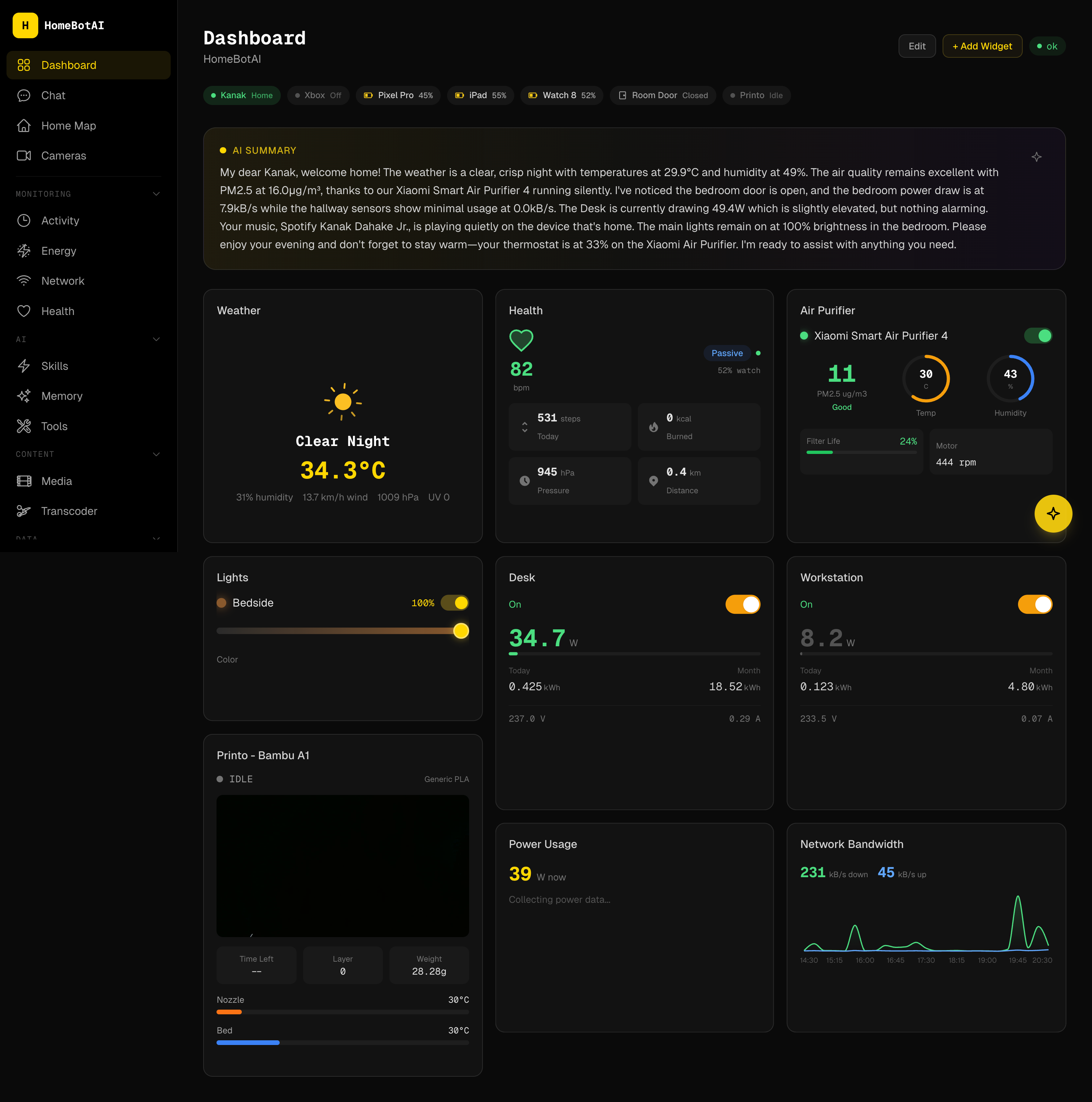
Widget Types
| Type | Description | Config |
|---|---|---|
stat |
Single entity value | entity_id, unit |
toggle_group |
Grid of toggleable entities | entities[] |
sensor_grid |
Grid of sensor readings | entities[] |
camera |
Camera snapshot with refresh | entity_id |
quick_actions |
Buttons that call Home Assistant services | actions[] |
weather |
Weather summary | entity_id |
scene_buttons |
Scene activation | scenes[] |
ai_summary_banner |
AI-generated home summary | (auto) |
air_purifier |
Air purifier controls | entity_id |
bandwidth_chart |
Network bandwidth chart | (auto) |
climate_control |
Climate and thermostat control | entity_id |
gauge |
Gauge visualization | entity_id, min, max |
health |
Health metrics display | (auto) |
light_control |
Light brightness and color | entity_id |
power_chart |
Power consumption chart | entities[] |
presence |
Presence tracking | (auto) |
printer |
3D printer status | entity_id |
room_environment |
Room temperature, humidity, and AQI | entities[] |
smart_plug |
Smart plug with power | entity_id |
weather_card |
Detailed weather card | entity_id |
Widget Builder
The Widget Builder is an AI-powered flow for creating widgets using generative UI. You select entities, describe what you want in plain language, and the assistant produces a JSON widget specification. That spec is rendered by GenUIRenderer, so new layouts stay consistent with the rest of the dashboard.
Layout and persistence
The grid uses react-grid-layout: drag-and-drop positioning, responsive breakpoints, and saved layout state so your arrangement survives reloads.
Dashboard Editor
A floating control opens the Dashboard Editor panel (bottom-right). You can issue natural-language commands to add, remove, resize, or reorder widgets without editing JSON by hand. The editor is scoped to layout changes; it does not directly toggle devices outside the normal dashboard controls.
Example requests:
- Add a stat widget for desk power consumption.
- Remove the weather card.
- Make the lights toggle group full width.
- What entities can I add?
- Add a camera for the bedroom.
- Move scenes to the top.
API endpoints
| Method | Path | Description |
|---|---|---|
| GET | /api/dashboard |
Returns the current dashboard config JSON |
| PUT | /api/dashboard |
Saves a new config directly |
| POST | /api/dashboard/edit |
AI-assisted layout editing from natural language |
| GET | /api/dashboard/summary |
Summary data used for AI banners and context |
| POST | /api/generate-widget |
Generates a widget spec (generative UI pipeline) |
| POST | /api/suggest-widget |
Suggests widget ideas based on context |
Architecture flow
User -> Dashboard Editor panel -> POST /api/dashboard/edit
  -> Gemini -> Updated config -> SQLite -> Frontend re-renders
The backend persists configuration (for example in a dashboard_config table). After each successful edit, the frontend reloads the config and GenUIRenderer / widget components redraw the grid.