HomeBotAI -- System Architecture
This document describes the full architecture of HomeBotAI: the FastAPI backend, LangGraph agent, three-layer memory, tooling surface, Next.js dashboard, Deep Agent service, and transcoder. It is written for operators and contributors who need a mental model of how components connect and where to change behavior.
How to read this page
Use the table of contents for navigation. Mermaid diagrams render in the browser when MkDocs Material and the Mermaid extension are enabled. Collapsible sections group API routes by domain to keep the reference scannable.
1. System overview
HomeBotAI is a multi-service stack: a primary Backend API (agent, memory, tools, Home Assistant integration), a Dashboard for operators, a Telegram entry point, a Deep Agent API for specialized long-running tasks, and a Transcoder for media jobs. SQLite backs persistence for chat history, semantic facts, skills, and dashboard configuration.
Service topology
Users reach HomeBotAI through the Dashboard or Telegram. Requests flow into three core services that share a persistence layer and fan out to external integrations.
graph LR
  subgraph users [Users]
    Browser
    TelegramApp[Telegram]
  end

  subgraph surfaces [Client Surfaces]
    Dashboard["Dashboard :3001"]
    TGBot["Telegram Bot"]
  end

  subgraph core [Core Services]
    Backend["Backend API :8321"]
    DeepAgent["Deep Agent :8322"]
    TranscoderSvc["Transcoder"]
  end

  subgraph integrations [Integrations]
    HA["Home Assistant"]
    MediaStack["Media Stack\nSonarr / Radarr / Jellyfin\nTransmission / Jellyseerr / Prowlarr"]
    Ollama["Ollama"]
  end

  SQLite[(SQLite)]

  Browser --> Dashboard
  TelegramApp --> TGBot
  TGBot --> Backend
  Dashboard --> Backend
  Dashboard --> DeepAgent
  Backend <--> HA
  Backend <--> MediaStack
  Backend <--> Ollama
  DeepAgent <--> HA
  DeepAgent <--> MediaStack
  DeepAgent <--> Ollama
  TranscoderSvc --> MediaStack
  Backend --> SQLite
  DeepAgent --> SQLite
  TranscoderSvc --> SQLite
Ports and roles
The dashboard talks to the Backend on 8321 and the Deep Agent on 8322 for different workloads. The Telegram bot uses the Backend only. The Transcoder exposes its own FastAPI surface for library browsing and job control.
Chat request lifecycle
A single user message triggers a multi-step pipeline: context assembly, ReAct reasoning with tool calls, and streamed response delivery.
sequenceDiagram
  participant U as User
  participant D as Dashboard
  participant API as Backend API
  participant Mem as Memory
  participant Agent as LangGraph Agent
  participant LLM as Gemini / Ollama
  participant Tools as Tool Registry
  participant HA as Home Assistant

  U ->> D: sends message
  D ->> API: POST /api/chat/stream
  API ->> Mem: load episodic + semantic context
  API ->> Agent: invoke with state + history
  Agent ->> LLM: prompt with system context
  LLM -->> Agent: tool_call decision
  Agent ->> Tools: execute tool
  Tools ->> HA: call service / get state
  HA -->> Tools: result
  Tools -->> Agent: tool_result
  Agent ->> LLM: continue reasoning
  LLM -->> Agent: final response
  Agent -->> API: SSE stream events
  API -->> D: thinking | tool_call | response
  D -->> U: renders streamed reply
Agent internals
The backend brain assembles a grounded system prompt from three sources, then enters a ReAct loop that alternates between LLM reasoning and tool execution until it can produce a final answer.
graph TB
  subgraph prompt [System Prompt Construction]
    StateCache["State Cache\nfiltered HA entities"]
    SemanticMem["Semantic Memory\nuser preferences"]
    ProceduralMem["Learned Skills\nprocedural memory"]
  end

  subgraph react [ReAct Loop]
    LLM["LLM\nGemini / Ollama"]
    Decide{Think or Act}
    ToolExec["Tool Execution\n59 tools"]
  end

  subgraph output [Output]
    SSE["SSE Stream\nthinking | tool_call | response"]
  end

  StateCache --> LLM
  SemanticMem --> LLM
  ProceduralMem --> LLM
  LLM --> Decide
  Decide -->|"needs data"| ToolExec
  ToolExec --> LLM
  Decide -->|"ready"| SSE
2. Backend
Entry points
| Entry point | File | Purpose | Transport |
|---|---|---|---|
| Telegram | main.py |
Production chat | Long polling |
| API | api.py |
REST + SSE (dashboard) | HTTP (:8321) |
| CLI | cli.py |
Developer REPL | stdin / stdout |
Application bootstrap
bootstrap.py exposes create_app(), which:
- Initializes memory stores (episodic, semantic, procedural)
- Registers all tools bound to the runtime configuration
- Builds the LangGraph agent graph used by chat and API
- Connects the Home Assistant WebSocket for live entity state
Single source of wiring
Most cross-cutting setup lives in create_app() so tests and alternate entry points (CLI, scripts) share the same initialization path as production.
3. Agent (agent.py)
| Concern | Implementation |
|---|---|
| Primary model | gemini-2.5-flash via langchain-google-genai |
| Fallback | Ollama routing through llm.py and model_policy.py |
| Orchestration | langgraph.prebuilt.create_react_agent (ReAct loop) |
| System prompt | Built per request: live HA state, learned skills, semantic memory |
| State summary | Relevance-filtered: active lights, climate, playing media, anomalies |
| History | Last 10 conversation turns from episodic memory |
| Streaming | run_stream() yields typed events: thinking, tool_call, tool_result, response, error |
The agent is the interactive brain of the Backend: tool calls are explicit steps in the ReAct loop, and streaming events let the dashboard and Telegram render progress without blocking on the full completion.
4. Memory (three layers)
| Layer | Purpose | Storage | Lifecycle |
|---|---|---|---|
| Episodic | Chat history | SQLite, per chat_id |
Auto-trimmed to 50 turns |
| Semantic | User preferences, stable facts | SQLite key-value | Persistent |
| Procedural | Skills, routines, automation | SQLite + event log | User-managed |
Episodic memory feeds short conversational context; semantic memory grounds preferences across sessions; procedural memory ties user-defined skills and reactor triggers to durable records.
5. Tools (59 registered in backend)
Tools are Python-callable capabilities registered at bootstrap. The table below lists categories, counts, tool names, and source modules.
| Category | Count | Tools | Source |
|---|---|---|---|
| Home Assistant | 4 | ha_call_service, ha_get_camera_snapshot, ha_trigger_automation, ha_fire_event |
tools/homeassistant.py |
| Skills | 7 | create_skill, execute_skill, list_skills, update_skill, delete_skill, toggle_skill, get_event_log |
tools/skills.py |
| Memory | 2 | remember, recall |
tools/memory_tools.py |
| Scenes | 3 | create_scene, activate_scene, delete_scene |
tools/scenes.py |
| Sonarr | 8 | sonarr_search, sonarr_add_series, sonarr_get_queue, sonarr_get_series, sonarr_get_calendar, sonarr_delete_series, sonarr_episode_search, sonarr_get_history |
tools/sonarr.py |
| Radarr | 8 | radarr_search, radarr_add_movie, radarr_get_queue, radarr_get_movies, radarr_get_calendar, radarr_delete_movie, radarr_movie_search, radarr_get_history |
tools/radarr.py |
| Transmission | 8 | transmission_get_torrents, transmission_add_torrent, transmission_pause_resume, transmission_remove_torrent, transmission_set_alt_speed, transmission_get_session_stats, transmission_set_priority, transmission_get_free_space |
tools/transmission.py |
| Jellyseerr | 5 | jellyseerr_search, jellyseerr_request, jellyseerr_get_requests, jellyseerr_approve_decline, jellyseerr_get_request_status |
tools/jellyseerr.py |
| Prowlarr | 5 | prowlarr_search, prowlarr_get_indexers, prowlarr_get_indexer_stats, prowlarr_grab_release, prowlarr_get_health |
tools/prowlarr.py |
| Jellyfin | 9 | jellyfin_search, jellyfin_get_libraries, jellyfin_get_latest, jellyfin_get_sessions, jellyfin_system_info, jellyfin_playback_control, jellyfin_mark_played, jellyfin_get_item_details, jellyfin_get_resume |
tools/jellyfin.py |
6. State cache (state.py)
The state cache maintains a live in-memory mirror of Home Assistant entities, updated over the HA WebSocket connection.
| Behavior | Description |
|---|---|
| Summary injection | A relevance-filtered summary is injected into the system prompt |
| Context-aware filtering | Mentioning e.g. printer surfaces 3D printer telemetry without dumping every entity |
| Recent changes | Tracks recent entity transitions for conversational grounding |
| Anomalies | Highlights unusual readings or states for the agent to reason about |
This layer decouples raw HA state volume from what the model actually sees each turn.
7. Reactor (reactor.py)
The reactor is the proactive automation engine running alongside the conversational agent.
| Trigger type | Mechanism |
|---|---|
| Schedule | Cron-style schedules via APScheduler |
| State change | Home Assistant entity transitions |
| Skills | User-defined skills declare triggers the reactor monitors |
Skills can therefore fire on time, on HA changes, or both, without requiring an open chat session.
8. Notifier (notifier.py)
The notifier sends proactive Telegram messages based on rules, for example:
- Printer job finished
- Battery low (threshold under 15%)
- Welcome home / left home style presence transitions
A 5-minute cooldown per entity reduces duplicate alerts when state flutters.
9. LLM module (llm.py)
llm.py provides a provider abstraction over:
- Google GenAI (primary path for the main agent and many features)
- Ollama (local and fallback routing)
Model resolution follows configuration and model_policy.py. The same stack supports skill execution, dashboard summaries, and media discovery flows that need text generation outside the main chat graph.
10. API endpoints (65+ routes)
Routes are grouped below by domain. Expand a section to scan methods and paths quickly.
Chat endpoints
| Method | Path |
|---|---|
POST |
/api/chat |
POST |
/api/chat/stream |
GET |
/api/chat/threads |
GET |
/api/chat/{id}/history |
DELETE |
/api/chat/{id}/history |
Health
| Method | Path |
|---|---|
GET |
/api/health |
GET |
/api/health/data |
Models
| Method | Path |
|---|---|
GET |
/api/models |
Tools
| Method | Path |
|---|---|
GET |
/api/tools |
Skills
| Method | Path |
|---|---|
GET |
/api/skills |
POST |
/api/skills |
GET |
/api/skills/{id} |
PUT |
/api/skills/{id} |
DELETE |
/api/skills/{id} |
POST |
/api/skills/{id}/toggle |
POST |
/api/skills/{id}/execute |
Entities
| Method | Path |
|---|---|
GET |
/api/entities |
POST |
/api/entities/{id}/toggle |
POST |
/api/entities/{id}/light |
POST |
/api/entities/{id}/climate |
Events
| Method | Path |
|---|---|
GET |
/api/events |
Memory
| Method | Path |
|---|---|
GET |
/api/memory |
POST |
/api/memory |
DELETE |
/api/memory/{key} |
Cameras
| Method | Path |
|---|---|
POST |
/api/cameras/{id}/snapshot |
GET |
/api/snapshots/{filename} |
Dashboard
| Method | Path |
|---|---|
GET |
/api/dashboard |
PUT |
/api/dashboard |
POST |
/api/dashboard/edit |
GET |
/api/dashboard/summary |
POST |
/api/generate-widget |
POST |
/api/suggest-widget |
Network
| Method | Path |
|---|---|
GET |
/api/network |
Energy
| Method | Path |
|---|---|
GET |
/api/energy |
Analytics
| Method | Path |
|---|---|
GET |
/api/analytics |
Reports
| Method | Path |
|---|---|
GET |
/api/reports/summary |
Scenes
| Method | Path |
|---|---|
GET |
/api/scenes |
POST |
/api/scenes |
POST |
/api/scenes/{id}/activate |
DELETE |
/api/scenes/{id} |
Floorplan
| Method | Path |
|---|---|
GET |
/api/floorplan/config |
PUT |
/api/floorplan/config |
Device aliases
| Method | Path |
|---|---|
GET |
/api/devices/aliases |
PUT |
/api/devices/aliases/{mac} |
DELETE |
/api/devices/aliases/{mac} |
Notifications
| Method | Path |
|---|---|
GET |
/api/notifications/rules |
PUT |
/api/notifications/rules/{id} |
Media
| Method | Path |
|---|---|
GET |
/api/media/overview |
GET |
/api/media/search |
GET |
/api/media/downloads |
POST |
/api/media/downloads/{id}/action |
GET |
/api/media/tv |
GET |
/api/media/movies |
GET |
/api/media/library |
GET |
/api/media/requests |
GET |
/api/media/discover |
Server
| Method | Path |
|---|---|
GET |
/api/server/containers |
GET |
/api/server/tunnel |
POST |
/api/server/tunnel |
DELETE |
/api/server/tunnel/{subdomain} |
GET |
/api/server/backups |
11. Dashboard (18 pages)
The dashboard is a Next.js application on port 3001 in development; in Docker it is typically mapped from container port 3000.
| Route | Purpose | Screenshot asset |
|---|---|---|
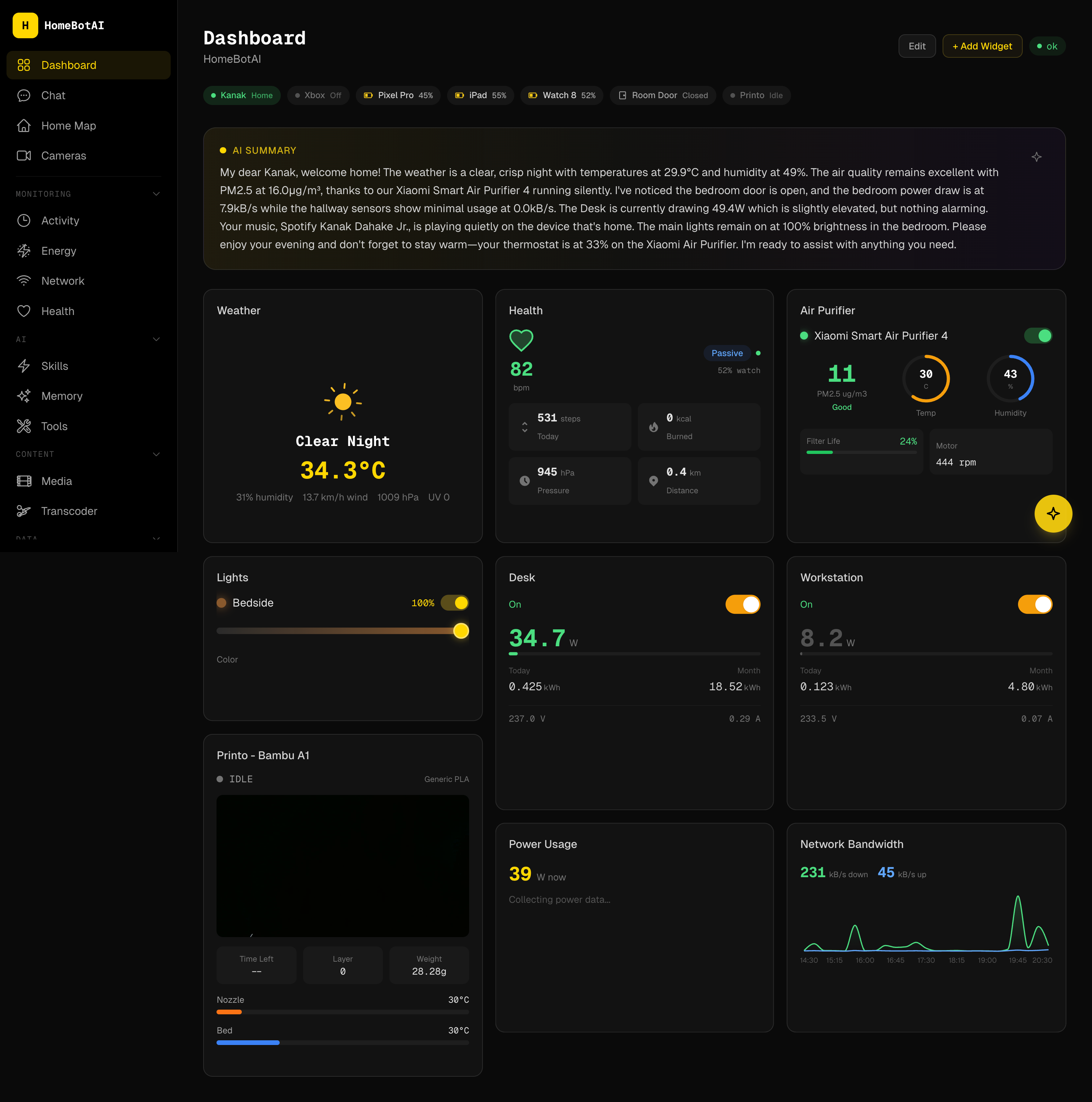
/ |
Dashboard -- AI-customizable widget grid | assets/screenshots/dashboard.png |
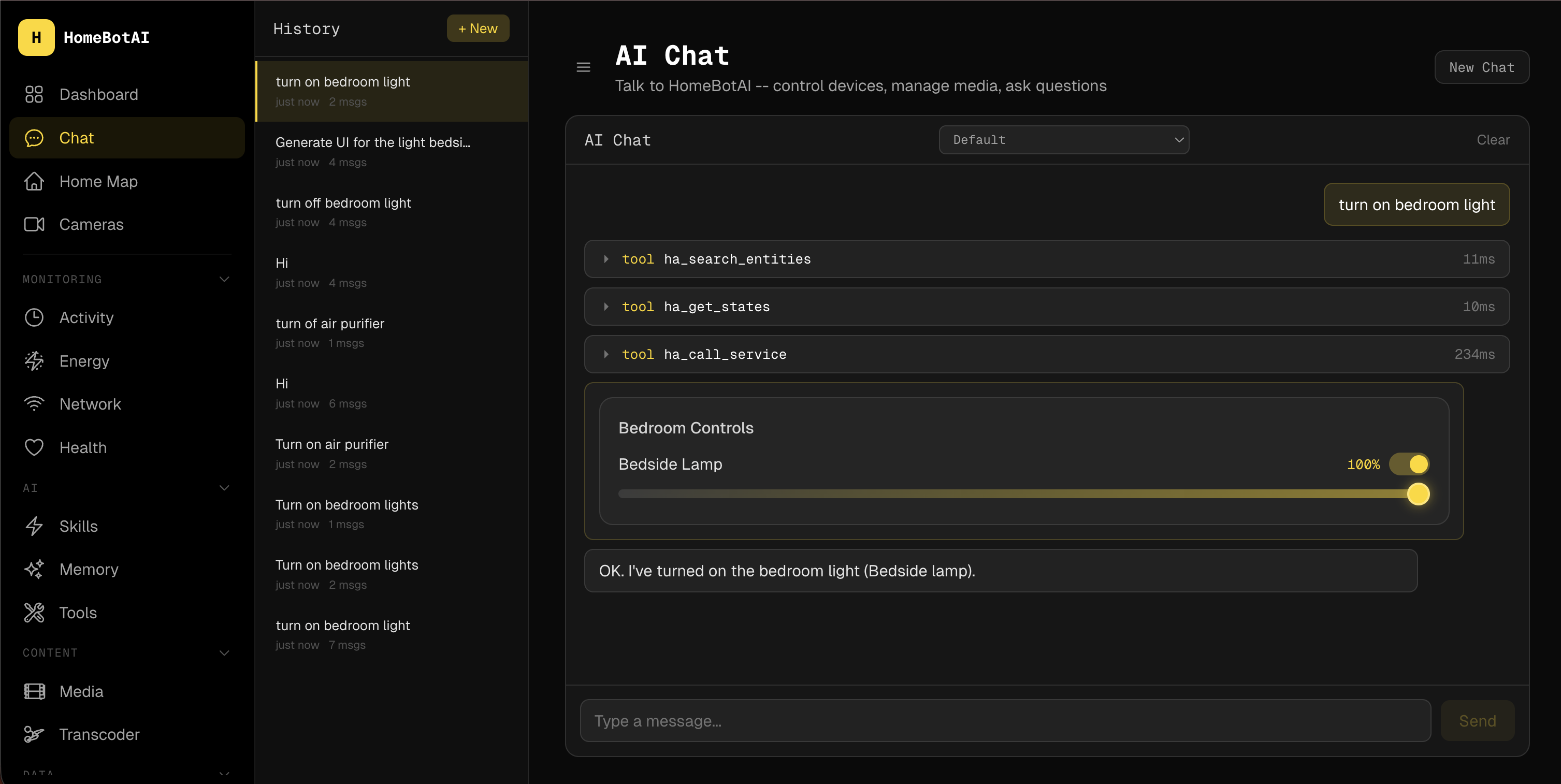
/chat |
AI conversation with SSE streaming | assets/screenshots/chat.png |
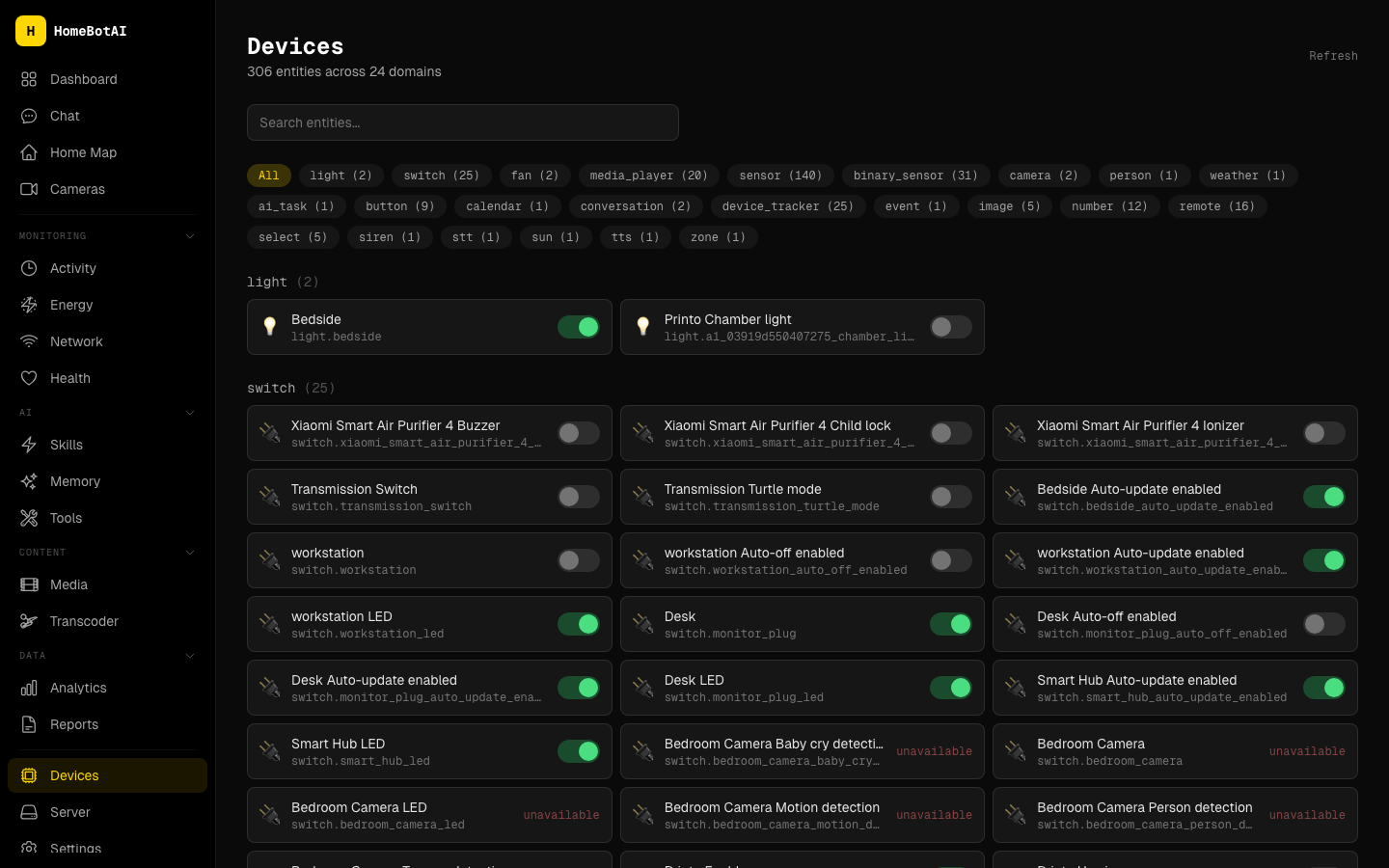
/devices |
Entity browser with domain filters | assets/screenshots/devices.png |
/cameras |
Live camera snapshots | assets/screenshots/cameras.png |
/activity |
Real-time event stream | assets/screenshots/activity.png |
/energy |
Power and energy charts, battery levels | assets/screenshots/energy.png |
/network |
Mesh nodes, clients, bandwidth | assets/screenshots/network.png |
/media |
Unified media management | assets/screenshots/media.png |
/health |
Wearable health metrics | assets/screenshots/health.png |
/analytics |
Historical trends | assets/screenshots/analytics.png |
/reports |
Long-term data summaries | assets/screenshots/reports.png |
/skills |
Skill manager with triggers | assets/screenshots/skills.png |
/home-map |
Interactive SVG floorplan | assets/screenshots/home-map.png |
/memory |
Semantic memory facts | assets/screenshots/memory.png |
/tools |
Tool reference by category | assets/screenshots/tools.png |
/settings |
Notification rules, aliases | assets/screenshots/settings.png |
/server |
Docker, Cloudflare tunnel, backups | assets/screenshots/server.png |
/transcoder |
Library browser, transcode jobs | assets/screenshots/transcoder.png |
Screenshot references (key pages)
Images are resolved relative to the docs root (docs/). Place files under docs/assets/screenshots/.
12. Widget system
| Aspect | Detail |
|---|---|
| Component count | 19 widget types |
| Rendering | DashboardRenderer renders from JSON dashboard configuration |
| AI creation | WidgetBuilder assists AI-powered widget creation |
| Editing | WidgetEditModal for in-place edits |
| Generative UI | Catalog and registry: catalog.ts, registry.tsx, GenUIRenderer.tsx |
| Layout | react-grid-layout for drag-and-drop and responsive grids |
Widget types: AiSummaryBanner, AirPurifier, BandwidthChart, Camera, ClimateControl, Gauge, Health, LightControl, PowerChart, Presence, Printer, QuickActions, RoomEnvironment, SceneButtons, SensorGrid, SmartPlug, Stat, ToggleGroup, WeatherCard, Weather.
13. Frontend architecture
Tech stack
| Layer | Choice |
|---|---|
| Framework | Next.js 15 |
| Language | TypeScript |
| Styling | Tailwind CSS |
| Motion | Framer Motion |
| Grid layout | react-grid-layout |
Key file tree (representative)
dashboard/
├── app/                    # App Router pages and layouts
├── components/
│   ├── dashboard/          # DashboardRenderer, widgets, modals
│   ├── chat/               # SSE chat UI
│   └── ...
├── lib/
│   ├── api.ts              # fetchJSON, SSE helpers
│   └── hooks/              # useChat, useEntities, etc.
├── widgets/
│   ├── catalog.ts          # Widget metadata for AI / builder
│   ├── registry.tsx        # Component registry
│   └── GenUIRenderer.tsx   # Generative UI bridge
└── public/
The frontend treats the Backend as the single source of truth for entities, memory, and skills, while the Deep Agent is invoked for workloads that need the separate tool surface and skills bundle.
14. Deep Agent
The Deep Agent is a standalone FastAPI service on port 8322. It uses the LangChain Deep Agents architecture with a dedicated LangGraph graph.
| Aspect | Detail |
|---|---|
| Port | 8322 |
| Tools | 49 tools across 8 modules |
| Modules | Home Assistant (5), Sonarr (8), Radarr (8), Jellyfin (9), Transmission (8), Jellyseerr (5), Prowlarr (5), render_ui (1) |
| Skills | SKILL.md skills: device-control, media-management, energy-insights, network-diagnostics |
| Routing | Model policy selects Ollama vs Google GenAI per configuration |
The dashboard can call this service in parallel with the main Backend when a task benefits from the Deep Agent toolpack and skill documents.
15. Transcoder
The transcoder is a HandBrake-based service for batch and on-demand transcoding.
| Module | Role |
|---|---|
transcoder.py |
Core encode pipeline and job orchestration |
api.py |
FastAPI HTTP surface |
db.py |
SQLite persistence for jobs and metadata |
scanner.py |
Library scanning and inventory |
scheduler.py |
Scheduled transcode jobs |
config.py |
Service configuration |
The dashboard /transcoder page talks to this service for library browsing and job control; HandBrake runs as the actual encoder backend.
16. Docker deployment
Typical Compose-style service definitions:
homebot:
  build: ./backend
  ports: ["8321:8321"]

homebot-dashboard:
  build: ./dashboard
  ports: ["3001:3000"]

homebot-deepagent:
  build: ./deepagent
  ports: ["8322:8322"]

transcoder:
  build: ./transcoder
Adjust image names, networks, volumes, and environment files to match your host. SQLite files and media libraries should live on persistent volumes where noted in your deployment docs.
Related documentation
- Deep Agent -- focused guide to the 8322 service
- Transcoder -- encoding and scheduling details
- API Reference -- request and response shapes